 Result as a Service · Free tier · Your connector is ready
Raza SOR
The free tier of Result as a Service. A personal record agent, built as a digital twin of Raza Rizwan's method, that counts how much of your workflow can be automated, tells you what stays human, and takes one step to a working AI worker.
Everything below is also in your inbox. Keep the access key to yourself.
Raza SOR combines four things an ordinary AI chatbot does not have:
- the governed knowledge of the Raza Rizwan System of Record: the counting method, the rules for what automates, five worked counts from different industries, the Build your agent room, and the AI prompting guide 2026
- Raza's own instructions for answering: apply the method to your workflow, never repeat an example, name both numbers, name the human gates, and never present a figure as a guarantee
- a citation on every answer: the page it came from and the record's generation, and an honest "the record does not cover this" when it does not
- a way back to Raza: your finished step table can be sent to him, with your permission, and he replies

Raza Rizwan, whose record is Raza SORRaza Rizwan is an Agentic AI engineer from Karachi, Pakistan, working as a Forward Deployed Engineer at Canz Marketing. He builds AI systems that hold a real job inside a business and deploys them where the business already works: ChatGPT, Claude, Codex, WhatsApp, Gmail. He builds three things: AI employees that own a defined job end to end, AI agents that do one task with tools and stop for a person at the gate, and MCP connectors that put a process and its rules inside any AI a team uses. Six years on GitHub and 111 original repositories, from predictive models in 2020 to AI employees and connectors in 2026, are read into the record from his account.
Raza SOR lives inside the AI agent you already use, including Claude and ChatGPT. Add one connector and, if you build, one skill. There is no separate app to install and no second interface to learn. Your AI agent is the runtime.
A record begins with a purpose
Raza SOR has one defined purpose:
Help you work out how much of your own workflow can be automated, decide what to automate first, and take one step to a working AI worker without guessing.
That focus makes it a vertical personal AI agent for operations work. It does not try to answer everything. It maintains one method, governed and cited, and applies it to the work you describe.
Most AI chatbots answer the question in front of them from memory. Raza SOR also knows where its answer comes from. It can:
- write your run down as a step table, in your own words
- tag every step AI, DECISION or TYPING, and count both numbers by name: today and could be
- name the human gates in your run and say plainly which parts should stay with a person
- ask you the six questions when steps are missing, because an incomplete run gives a flattering number
- compare your count with five worked counts from other industries, and say where yours is unusual
- take one counted step through the three gates and the twenty pages of the Build your agent room
- send your finished sketch to Raza, only when you say so
- cite the page and the generation for every answer, and say "not covered" when it is
One system, two roles
Raza SOR has two complementary roles.
It reads the work you describe, builds your step table, counts it, marks the gates, and tells you what to automate first and what to leave alone.
It is the one place Raza's method lives. When a portfolio page, a resume, a slide or a model's memory disagrees with the record, the record wins.
Raza SOR is a digital twin of Raza Rizwan's method: his counting procedure, his rules for what automates, his room for building a worker, his prompting guide, and his instructions for answering, encoded as a governed record an agent can read. In engineering, a digital twin represents a physical asset. Here, it represents a way of working. Every practitioner can eventually publish their own:
Raza SOR teaches one method for any workflow. A vertical record teaches and supports the work of its own profession.
One connector, one skill, three rooms
Behind the connector are three governed rooms working together:
Count your own workflow, the four conditions that decide a step, five worked counts, and the five rungs from one task to an AI-native company.
Twenty pages from the three gates to a basic, free, text-only worker behind a URL, tested end to end, plus the skill that lets a coding agent run the room.
Thirteen concepts every instruction written from the record follows: context, neutral framing, rubrics, the brainstorm-iterate loop, models checking models.
Together, these rooms produce something more capable than a chatbot with a system prompt. They create an answer that is grounded, cited, and the same next week.
Why it matters
The first generation of AI tools gave every business access to answers. The next generation gives every business a record it can trust, that understands:
- which steps of its work repeat
- which can be automated and which must stay with a person
- what to build first
- how to build it without guessing
- when to stop
Raza SOR is Raza's implementation of that future, and the record his own work runs on.
Set up Raza SOR
You add two things, once. The connector brings the record and its tools. The skill is how a coding agent builds from it. After that, one line starts a count. About two minutes in all.
Add the connector
- Open Connectors in your claude.ai sidebar under Customize.
- Click Add custom connector.
- Paste the Name and the MCP Server URL below. Click a row to copy it.
claude.ai/settings/customize-connectors
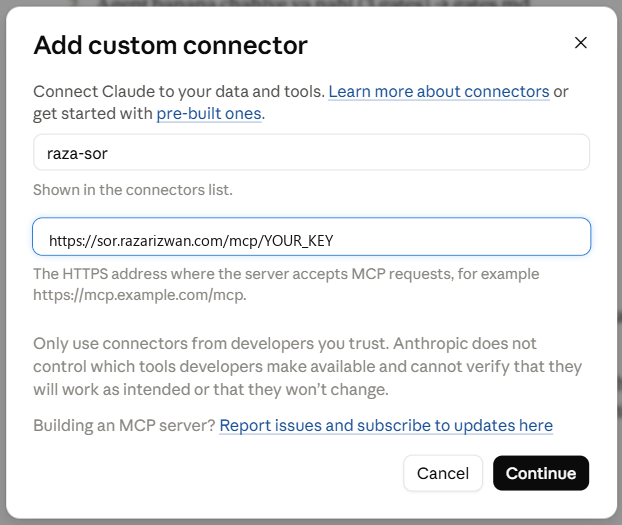
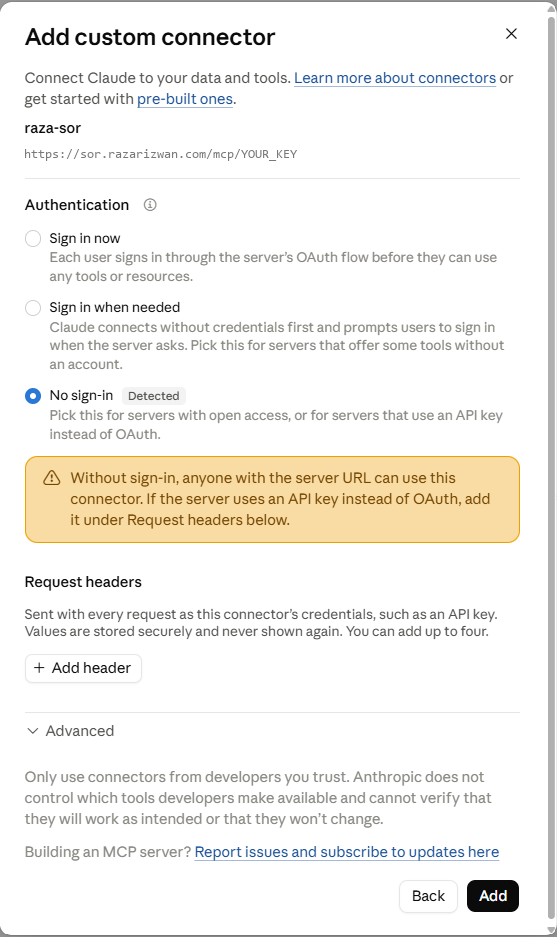
- Click Continue. Under Authentication choose No sign-in (Claude detects it). Leave Request headers empty; the key is already in the address. Click Add.
Do not type the key into a header or a client secret. It travels inside the address; anything else is ignored and the connector will not answer.claude.ai/settings/customize-connectors
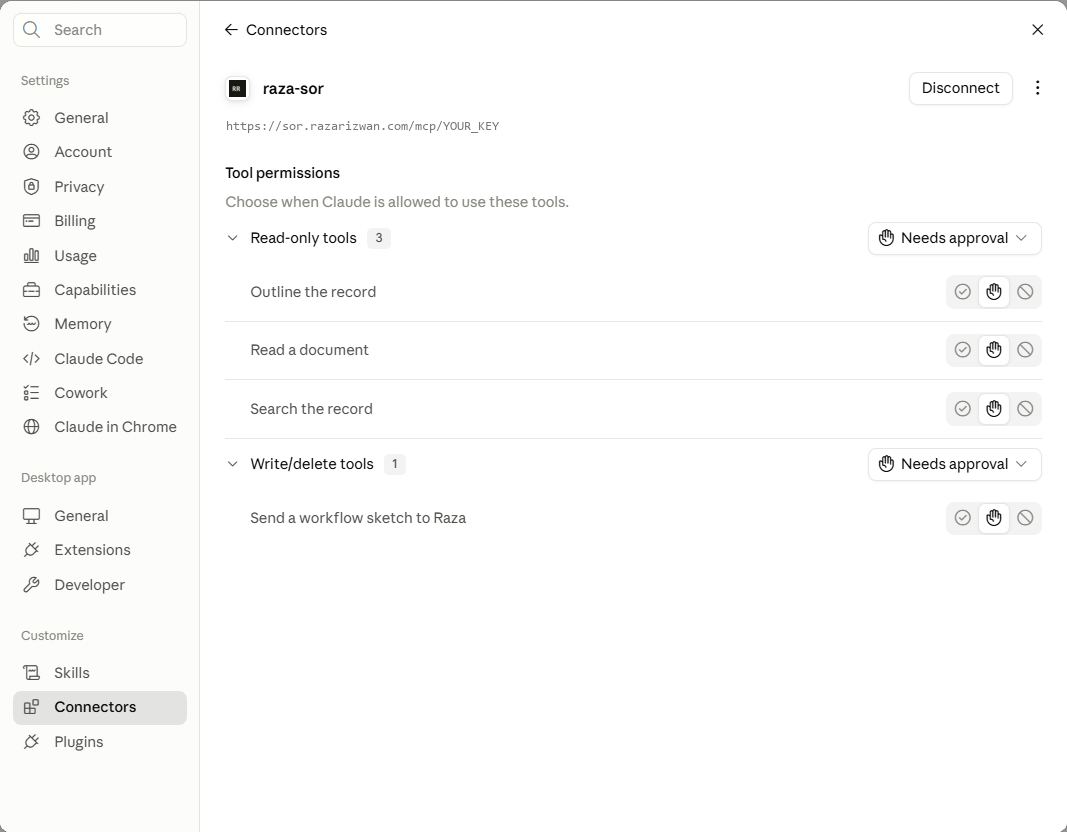
- Open the connector in your list. Under Tool permissions, set the three read-only tools (outline, read, search) to Always allow, so Claude does not stop to ask on every reply. Keep Send a workflow sketch to Raza on Needs approval: nothing leaves without your yes.
claude.ai/settings/customize-connectors
Add the skill
The skill is how a coding agent builds a worker from the record: when to read which page, what to produce, where to stop for you. Skip it if you only want to count and ask.
- Download the skill zip file. Download the zip →
- Open Skills in your claude.ai sidebar under Customize.
- Click Add, then Upload a skill.
claude.ai/settings/customize-skills
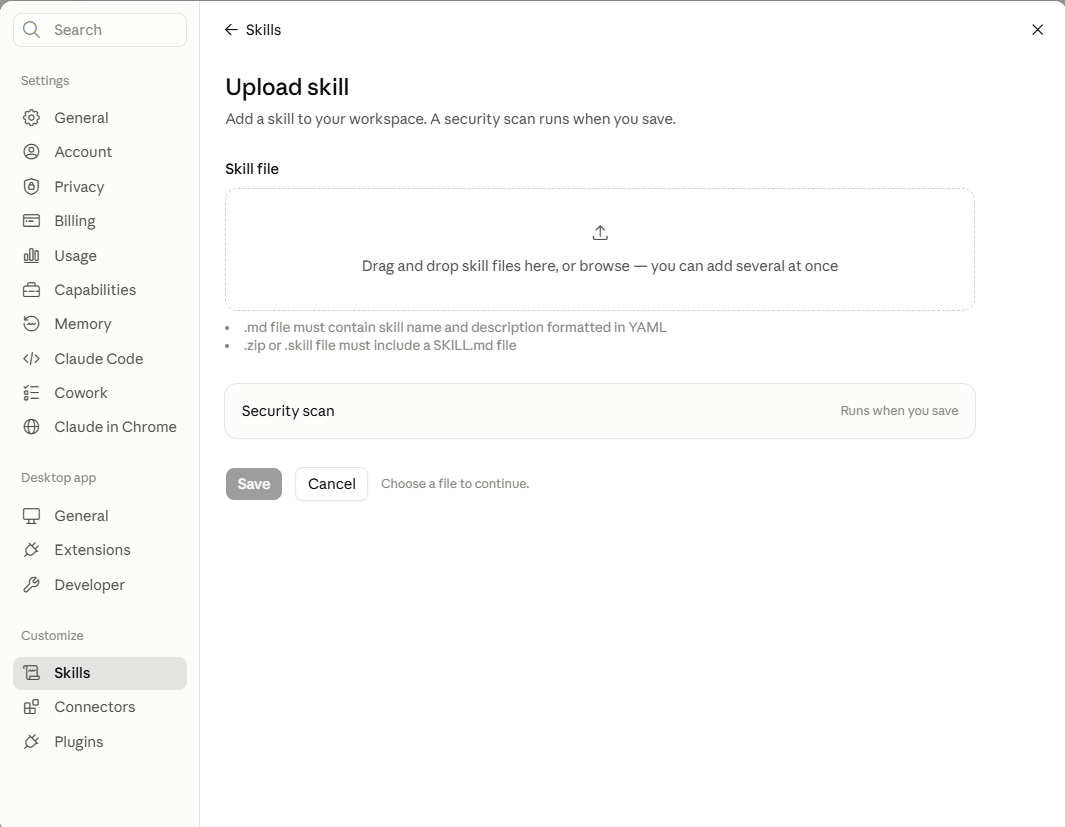
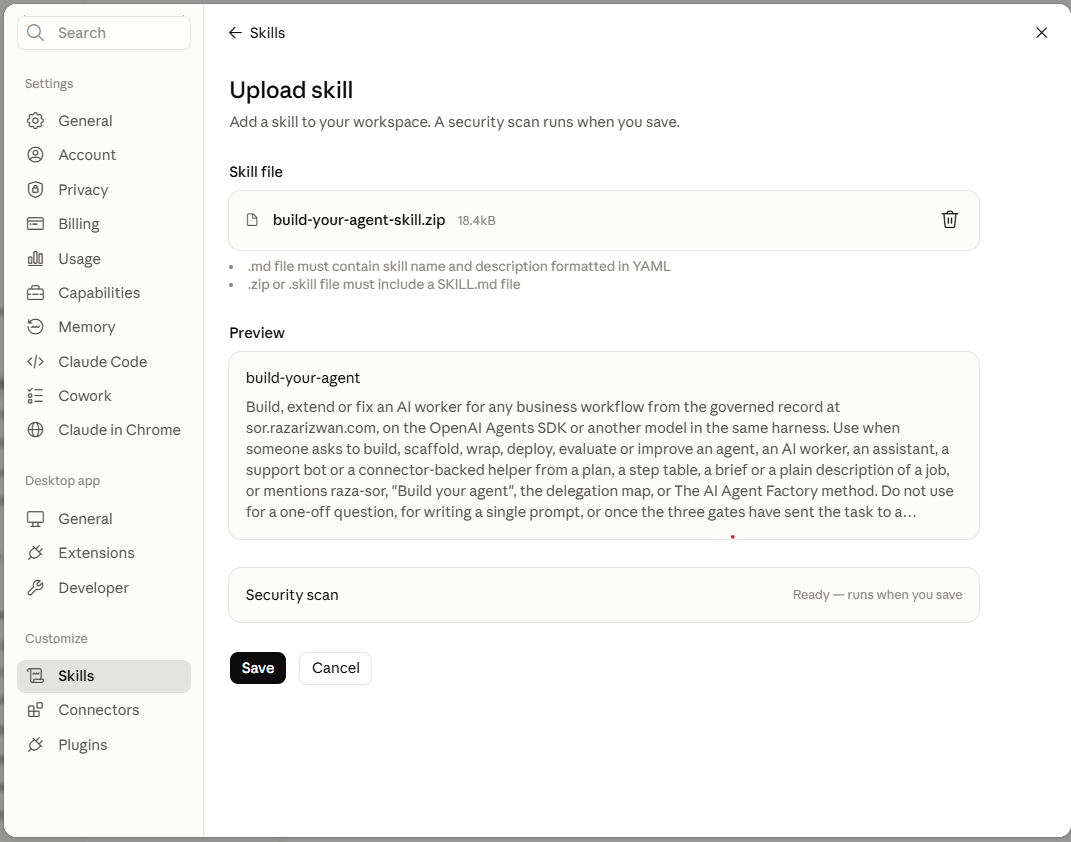
- Drop the file in, or click to pick it. Do not unzip it first. The preview shows build-your-agent and its description. Click Save; a security scan runs.
claude.ai/settings/customize-skills
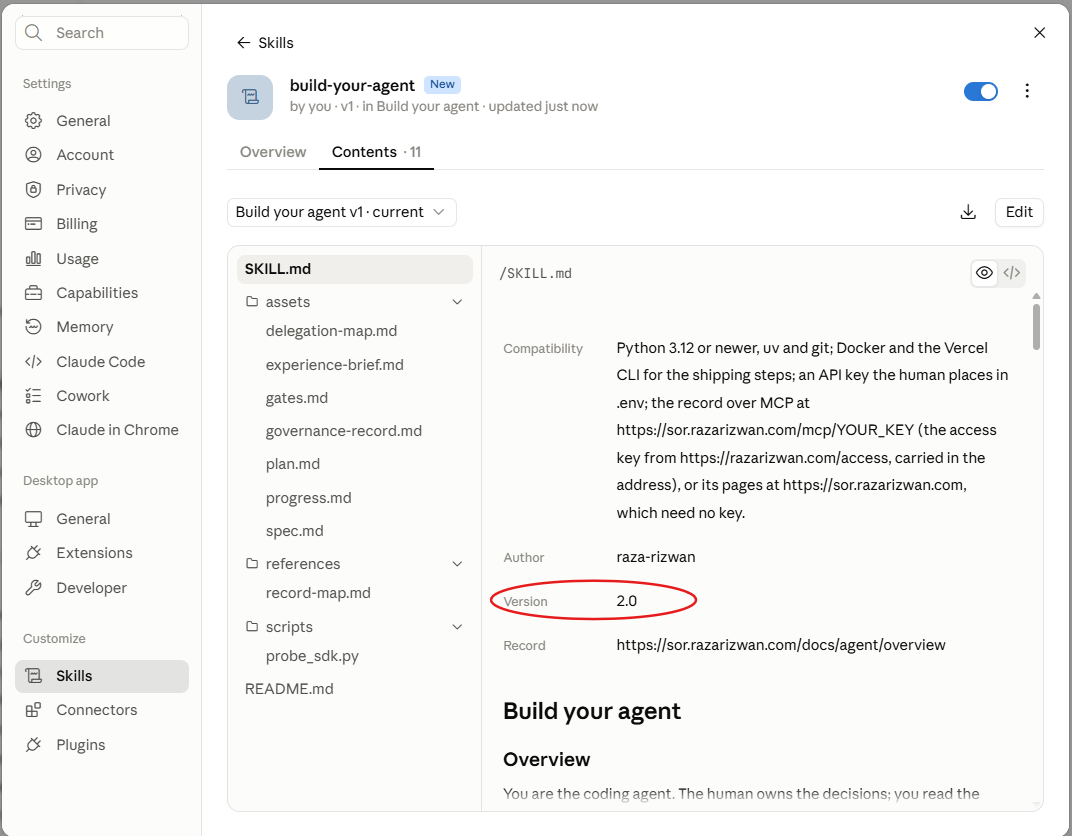
- The skill appears under Skills with its thirteen files: SKILL.md, the templates, the record map and the SDK probe. Version 2.2 is current.
claude.ai/settings/customize-skills
In claude.ai the skill plans with you: the map, the gates, the spec. The build steps need a terminal; in Claude Code the same zip goes into .claude/skills/ and runs as /build-your-agent. Attach the record there with one command:
Start counting
Open any chat in claude.ai and type this, with your own run after the colon:
Raza SOR builds your step table, gives you both numbers, names the gates, and offers to send the sketch. It comes only when you name it, so your other chats stay normal.
More to try:
- "Ask me the six questions before you count; I think I left steps out."
- "Which of my steps stay human in every business, and why?"
- "Run the three gates on step 4. Tool, chatbot or agent?"
- "Apply your prompting guide's delete test to this instruction: ..."
- "Which page is that from?" whenever an answer has no citation.
Add the connector
- In ChatGPT open Settings, then Connectors. If you do not see a Create button, open Advanced and turn on Developer mode (custom MCP connectors need it on some plans).
- Click Create. Paste the Name and the MCP Server URL below. Click a row to copy it.
- Authentication: No authentication. Click Create.
In the Codex app's MCP form the field called Bearer token env var takes the name of an environment variable, not the key. Leave it empty and put the whole address in the URL field.
- In a new chat, open the + or Tools menu and switch on Raza SOR. ChatGPT calls it when your question needs it.
Add the skill (Codex)
ChatGPT itself does not take skills; Codex, its coding agent, does. The skill is how Codex builds a worker from the record and stops at every human gate.
- Download the skill zip file. Download the zip →
- Unzip it into your project's skills folder, keeping the folder name:
- Attach the record to Codex once:
- Open Codex in that project. The skill is listed; call it with
$build-your-agent, or describe the job and it triggers on its own.
Start counting
In ChatGPT, with the connector on, type this with your own run after the colon:
To build with Codex instead, type this in the project where the skill lives:
Raza SOR builds your step table, gives you both numbers, names the gates, and offers to send the sketch. It comes only when you name it, so your other chats stay normal.
What to ask Raza SOR
Connected? Read a real, unedited conversation with the record inside Claude (who Raza is, what you can use today, how he works with a client, proof and contact), then the shape of a good ask, the patterns that work, and what the record will not do.